
In CQG Desktop or CQG One, you can write custom formulas for monitoring risk and account status using the "account." prefix. These formulas can be used to create custom columns or filters in the Account Summary widget.
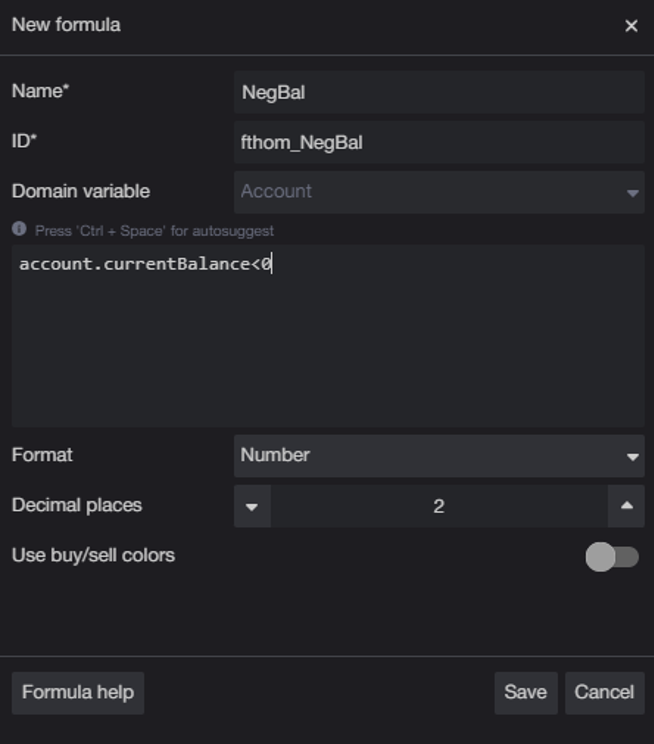
To create these formulas in CQG Desktop, open the Account Summary widget along with the Formulas widget, click the + button to create a new formula. Assign a name to the formula. Use the "account" prefix followed by the field name (two tables are below) you want to reference.
The formula editor supports elementary operations: "||", "&&", "|", "^", "&", "==", "!=", "<", ">", "<=", ">=", "<<", ">>", ">>>", "+", "-", "*", "/", "%"
To use the formula as a filter, check the "Condition" box. Save the formula.
In this example, we created a filter to show accounts with a negative balance:
Filter for negative balance:
account.currentBalance < 0
Go to the Filters menu in the Account Summary view and choose the filter you just created.
For more information regarding creating account conditions, including two videos, please visit MHelp Page Formulas.
For more information regarding setting up the Account Alerts, please visit MHelp Account Alerts.
Here are two tables detailing common uses of this functionality: The first table groups the Formula Fields, and the second table list the Formula Fields in alphabetical order.
For a more comprehensive presentation, download the pdf CQG_Account_Alert_Formula_Reference-1 at the bottom of the post. This document was assisted by AI and reviewed by Jim Stavros.
Available Account Formula Fields
| Category | Formula Field | Definition |
|---|---|---|
| Core Account Values | account.currentBalance | Account balance (cash balance in the account) |
| account.nlv | Net Liquidation Value (total value of the account including positions) | |
| account.ote | Open Trade Equity (unrealized P&L for futures positions) | |
| account.mvo | Market Value of Options (value of option positions) | |
| account.upl | Unrealized Profit/Loss (specifically for options) | |
| account.pl or account.profit_loss | Profit/Loss | |
| account.collateral | Collateral on Deposit | |
| Margin Related Fields | account.margin or account.margin_value | Total margin value/requirement |
| account.margin_excess | Margin Excess (calculated as: purchasing power - total margin value) | |
| account.purchasing_power | Purchasing Power (calculated as: balance + MVO + OTE) | |
| account.margin_credit | Margin Credit | |
| account.cash_excess | Cash Excess | |
| Calculated Values | account.ote_pl | OTE + P/L combined |
Key Definitions
| Term | Definition |
|---|---|
| Purchasing Power | Balance + MVO + OTE |
| Margin Excess | Purchasing Power - Total Margin Value |
| NLV (Net Liquidation Value) | Total account value including all positions |
| OTE (Open Trade Equity) | Unrealized profit/loss on futures positions |
| MVO (Market Value of Options) | Current market value of option positions |
| UPL (Unrealized Profit/Loss) | Specifically for options |
Notes:
- Values that change in real time include Balance, OTE, P/L, UPL, MVO, and NLV.
- Margin data is refreshed automatically when updated by your broker.
- Some values may display "N/A" when margin data is unavailable or when the margin subsystem is disabled for the account.
Account Value in Alphabetical Order
| Account Value | Simple Explanation |
|---|---|
| account.cashExcess | Cash available above the amount required for margin. Think of it as your extra cash cushion. |
| account.currentBalance | Your current account balance. Basically, the cash amount currently recorded in the account. |
| account.longOpenPositionsQty | The total quantity of long positions currently open — trades where you expect the price to rise. |
| account.margin | The amount of margin currently required to support your open positions. |
| account.marginCredit | A credit applied toward your margin requirement, depending on the broker/account setup. |
| account.marginExcess | The amount of margin you have available above the required margin. It represents your margin safety cushion. |
| account.minDaysTillPositionContractExpiration | The minimum number of days until one of your open contracts expires. |
| account.mvo | Market Value of Open positions — the current market value of your open positions. |
| account.netChangePercent | The percentage change in your account value, usually compared with a previous/reference value. |
| account.netLiquidationValuePercent | Net Liquidation Value expressed as a percentage, usually relative to a reference value. |
| account.noMultiplierPositionMargin | Position margin before applying the contract multiplier. Useful for seeing the underlying margin calculation. |
| account.openTradeLossUnrealizedLoss | The current unrealized loss from open trades. The loss isn't final until the position is closed. |
| account.oteUpl | Open Trade Equity / Unrealized P&L — the current profit or loss from positions that are still open. |
| account.oteUplAndPl | Unrealized P&L + realized P&L. Combines open-trade results with profit/loss from completed trades. |
| account.positionMargin | The margin required for your current positions. This is collateral tied up to support the trades. |
| account.profitLoss | Your profit or loss. Positive means profit; negative means loss. |
| account.purchasingPower | The amount you can |
Requires CQG One or Desktop.