
The CQG Quote Board is a classic quote display providing the open, high, low, last, and net change from the prior close.
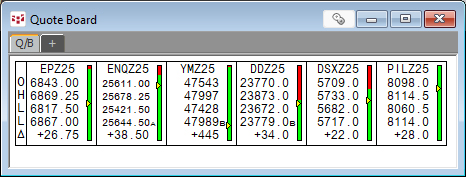
One feature unique to the CQG Quote Board is a symbol entered can include the time frame parameter (the symbol and the time frame is separated by a comma), such as EP,5. The display uses the current 5-minute bar open, high, low, last, and net change from the prior close of the 5-minute bar.

The first cell in the Quote Board displayed above is EP,5 (5-minute bars), below that is EP (Daily bar), below that is EP,W (Weekly Bars), and below that is EP,M (Monthly bars).
This post was authored during the first week in December, so the weekly and monthly values are the same.
At the end of the post is a downloadable CQG PAC that installs this page displayed below.

Select the title bar of the Quote Board and then double click on a cell in the first row and all four charts will update to the new symbol.
Requires CQG Integrated Client or CQG QTrader.