
The previous post: "Excel 365 REDUCE and LAMBDA Functions" detailed using Excel's REDUCE and LAMBDA functions to display a table of markets that are sorted by the contract month from a table of a number of futures contracts sorted by the symbols.
This post is an update. The sorted table now includes the Contract, Last Trade, Net Change, and Percentage Net Change. To add this data column C has been modified. The next image displays the updated column C.
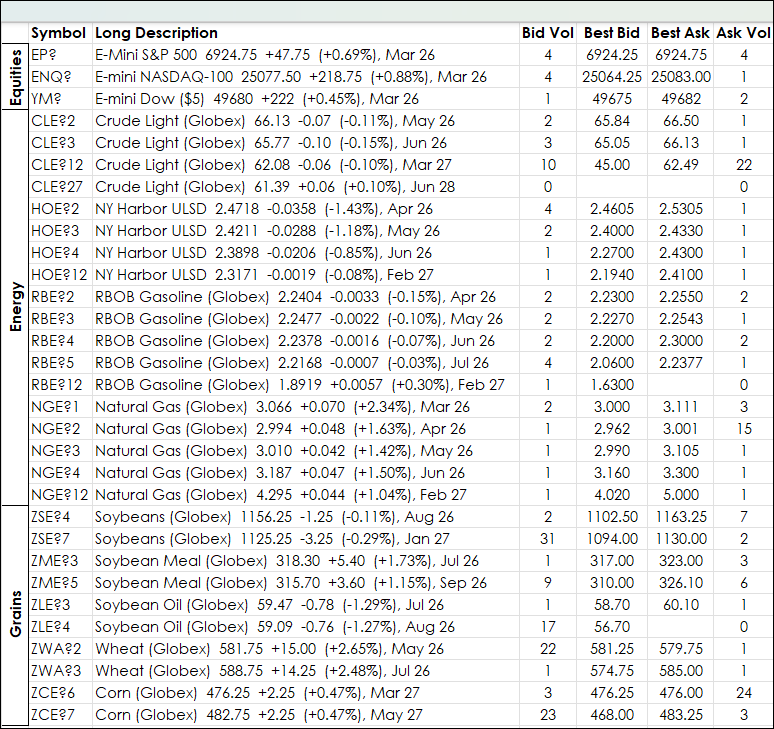
Column C uses Excel's TEXT function to add the Last Trade, Net Change and Percentage Net Change.
The TEXT function has a parameter that requires the number of decimals used be declared. As different markets have different price formats, the RTD formula for Tick Size is used. Then Excel's IFS function is used to set the parameter in the TEXT Function.
Column I sets the decimal size (this column is hidden) for each symbol in column B and is copied down:
=IFS(LEN(RTD("cqg.rtd", ,"ContractData",B2, "TickSize",, "T"))-2<=0,"0",LEN(RTD("cqg.rtd", ,"ContractData",B2, "TickSize",, "T"))-2=1,"0.00",LEN(RTD("cqg.rtd", ,"ContractData",B2, "TickSize",, "T"))-2=2,"0.00",LEN(RTD("cqg.rtd", ,"ContractData",B2, "TickSize",, "T"))-2=3,"0.000",LEN(RTD("cqg.rtd", ,"ContractData",B2, "TickSize",, "T"))-2=4,"0.0000",LEN(RTD("cqg.rtd", ,"ContractData",B2, "TickSize",, "T"))-2=5,"0.00000",LEN(RTD("cqg.rtd", ,"ContractData",B2, "TickSize",, "T"))-2=6,"0.000000",LEN(RTD("cqg.rtd", ,"ContractData",B2, "TickSize",, "T"))-2=7,"0.0000000")Modifying Column C requires five steps:
- Remove the Contract Month
- Add the Last Trade properly formatted
- Add the Net Change properly formatted
- Add the Percentage Net Change properly formatted
- Add back the Contract Month to the end
Here is the formula in cell C2 and is copied down:
=LEFT(RTD("cqg.rtd",,"ContractData",B2,"LongDescription",,"T"),LEN(RTD("cqg.rtd",,"ContractData",B2,"LongDescription",,"T"))-8)&" "&TEXT(RTD("cqg.rtd", ,"ContractData",B2, "LastTrade",, "T"),I2)&" "&IF(RTD("cqg.rtd",,"ContractData",B2,"NetLastTrade",,"T")>=0,"+"&TEXT(RTD("cqg.rtd",,"ContractData",B2,"NetLastTrade",,"T"),I2),TEXT(RTD("cqg.rtd",,"ContractData",B2,"NetLastTrade",,"T"),I2))&" ("&IFERROR(IF(RTD("cqg.rtd",,"ContractData",B2,"PerCentNetLastTrade",,"T")>=0,"+"&TEXT(RTD("cqg.rtd",,"ContractData",B2,"PerCentNetLastTrade",,"T")/100,"0.00%"),TEXT(RTD("cqg.rtd",,"ContractData",B2,"PerCentNetLastTrade",,"T")/100,"0.00%")),"")&")"&RIGHT(RTD("cqg.rtd",,"ContractData",B2,"LongDescription",,"T"),8)Above, the bolded text is the formula to Remove the Contract Month.
=LEFT(RTD("cqg.rtd",,"ContractData",B2,"LongDescription",,"T"),LEN(RTD("cqg.rtd",,"ContractData",B2,"LongDescription",,"T"))-8)&" "&TEXT(RTD("cqg.rtd", ,"ContractData",B2, "LastTrade",, "T"),I2)&" "&IF(RTD("cqg.rtd",,"ContractData",B2,"NetLastTrade",,"T")>=0,"+"&TEXT(RTD("cqg.rtd",,"ContractData",B2,"NetLastTrade",,"T"),I2),TEXT(RTD("cqg.rtd",,"ContractData",B2,"NetLastTrade",,"T"),I2))&" ("&IFERROR(IF(RTD("cqg.rtd",,"ContractData",B2,"PerCentNetLastTrade",,"T")>=0,"+"&TEXT(RTD("cqg.rtd",,"ContractData",B2,"PerCentNetLastTrade",,"T")/100,"0.00%"),TEXT(RTD("cqg.rtd",,"ContractData",B2,"PerCentNetLastTrade",,"T")/100,"0.00%")),"")&")"&RIGHT(RTD("cqg.rtd",,"ContractData",B2,"LongDescription",,"T"),8)Above, the text in bold Adds the Last Trade properly formatted
=LEFT(RTD("cqg.rtd",,"ContractData",B2,"LongDescription",,"T"),LEN(RTD("cqg.rtd",,"ContractData",B2,"LongDescription",,"T"))-8)&" "&TEXT(RTD("cqg.rtd", ,"ContractData",B2, "LastTrade",, "T"),I2)&" "&IF(RTD("cqg.rtd",,"ContractData",B2,"NetLastTrade",,"T")>=0,"+"&TEXT(RTD("cqg.rtd",,"ContractData",B2,"NetLastTrade",,"T"),I2),TEXT(RTD("cqg.rtd",,"ContractData",B2,"NetLastTrade",,"T"),I2))&" ("&IFERROR(IF(RTD("cqg.rtd",,"ContractData",B2,"PerCentNetLastTrade",,"T")>=0,"+"&TEXT(RTD("cqg.rtd",,"ContractData",B2,"PerCentNetLastTrade",,"T")/100,"0.00%"),TEXT(RTD("cqg.rtd",,"ContractData",B2,"PerCentNetLastTrade",,"T")/100,"0.00%")),"")&")"&RIGHT(RTD("cqg.rtd",,"ContractData",B2,"LongDescription",,"T"),8)Above, the text in bold Adds the Net Last Trade properly formatted (the "+" is also added),
=LEFT(RTD("cqg.rtd",,"ContractData",B2,"LongDescription",,"T"),LEN(RTD("cqg.rtd",,"ContractData",B2,"LongDescription",,"T"))-8)&" "&TEXT(RTD("cqg.rtd", ,"ContractData",B2, "LastTrade",, "T"),I2)&" "&IF(RTD("cqg.rtd",,"ContractData",B2,"NetLastTrade",,"T")>=0,"+"&TEXT(RTD("cqg.rtd",,"ContractData",B2,"NetLastTrade",,"T"),I2),TEXT(RTD("cqg.rtd",,"ContractData",B2,"NetLastTrade",,"T"),I2))&" ("&IFERROR(IF(RTD("cqg.rtd",,"ContractData",B2,"PerCentNetLastTrade",,"T")>=0,"+"&TEXT(RTD("cqg.rtd",,"ContractData",B2,"PerCentNetLastTrade",,"T")/100,"0.00%"),TEXT(RTD("cqg.rtd",,"ContractData",B2,"PerCentNetLastTrade",,"T")/100,"0.00%")),"")&")"&RIGHT(RTD("cqg.rtd",,"ContractData",B2,"LongDescription",,"T"),8)Above, the text in bold Adds the Percent Net Last Trade properly formatted (the "+" is also added), The IFError function is used in case there is no data, then a space is used.
=LEFT(RTD("cqg.rtd",,"ContractData",B2,"LongDescription",,"T"),LEN(RTD("cqg.rtd",,"ContractData",B2,"LongDescription",,"T"))-8)&" "&TEXT(RTD("cqg.rtd", ,"ContractData",B2, "LastTrade",, "T"),I2)&" "&IF(RTD("cqg.rtd",,"ContractData",B2,"NetLastTrade",,"T")>=0,"+"&TEXT(RTD("cqg.rtd",,"ContractData",B2,"NetLastTrade",,"T"),I2),TEXT(RTD("cqg.rtd",,"ContractData",B2,"NetLastTrade",,"T"),I2))&" ("&IFERROR(IF(RTD("cqg.rtd",,"ContractData",B2,"PerCentNetLastTrade",,"T")>=0,"+"&TEXT(RTD("cqg.rtd",,"ContractData",B2,"PerCentNetLastTrade",,"T")/100,"0.00%"),TEXT(RTD("cqg.rtd",,"ContractData",B2,"PerCentNetLastTrade",,"T")/100,"0.00%")),"")&")"&RIGHT(RTD("cqg.rtd",,"ContractData",B2,"LongDescription",,"T"),8)Above, the text in bold Adds the contract month back.
The formula to sort the table by contract month is entered into cell M2 and spills down:
=SUBSTITUTE(REDUCE("",C2:C32,LAMBDA(a,v,IF(TEXTAFTER(v,", ")=L2:L32,a&", "&TEXTBEFORE(v,","),a))),", ","",1)If symbols are added or deleted in column B then the array C2:C32 needs to be modified. If the array L2:L32 for the months is modified, then the formula above has to be modified.
Column L is the list of months and it automatically updates.
The result is the image below:
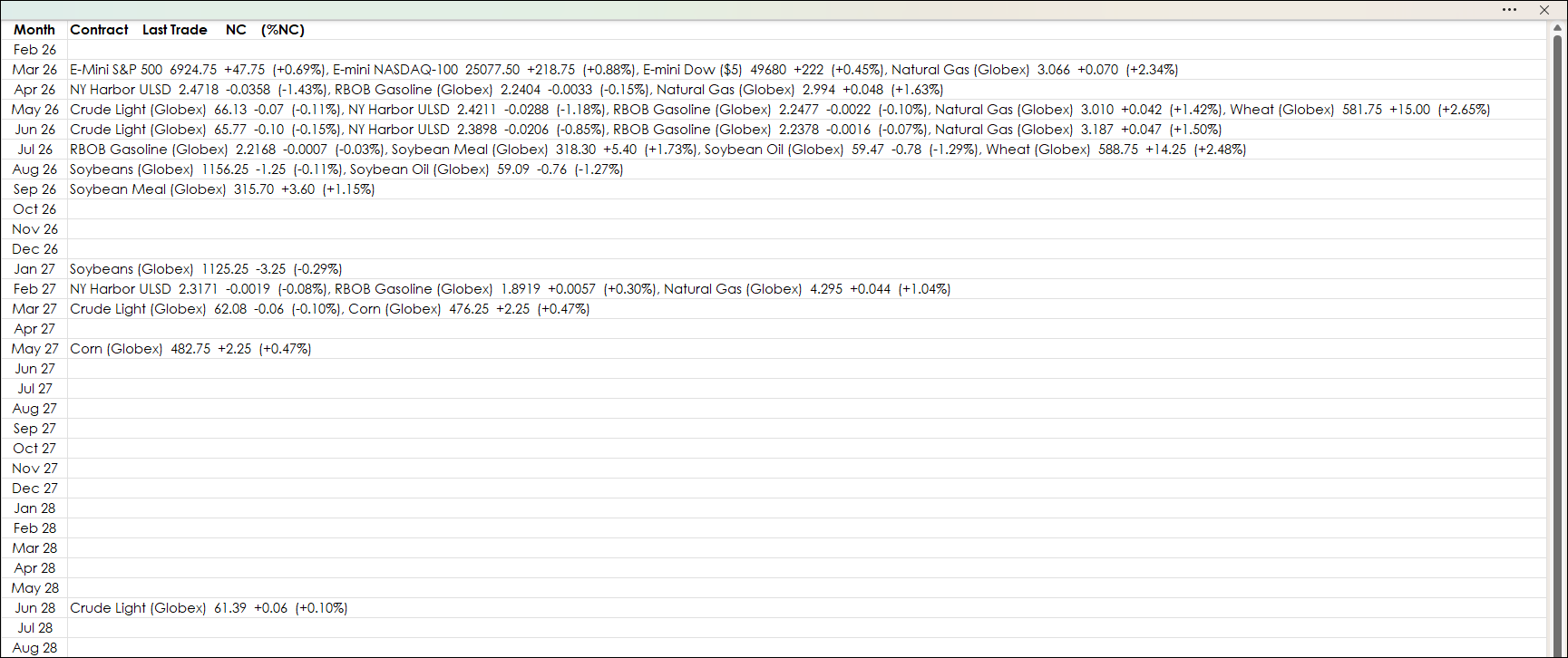
This post details using the REDUCE, LAMBDA and TEXT functions to sort markets by Contract Month and includes the current session's Last trade, Net Change and Percentage Net Change.
Requirements: CQG Integrated Client or QTrader, and Excel 365 (locally installed, not in the Cloud) or more recent.