
This post offers a sample spreadsheet with typical RTD formulas used for building a market quotes dashboard. You can download the dashboard and enter in symbols. All capital letters are required. The prices are manually formatted for the proper number of decimals.
The table below presents the market data called (and column titles) and the RTD Function used in the Excel dashboard. Column A in the spreadsheet is the Symbol column.
| Data | RTD Function |
|---|---|
| Long Description | =RTD("cqg.rtd", ,"ContractData", A2, "LongDescription",, "T") |
| Last Trade | =RTD("cqg.rtd", ,"ContractData", A2, "LastTrade",, "T") |
| Net Last Trade | =RTD("cqg.rtd", ,"ContractData", A2, "NetLastTrade",, "T") |
| Percent Net Last Trade | =IFERROR(RTD("cqg.rtd", ,"ContractData", A2, "PerCentNetLastTrade",, "T")/100,"") |
| Rank | =IFERROR(RANK(E2,$E$2:$E$5,0)+COUNTIF($E$2:E2,E2)-1,"") |
| Bid Volume | =RTD("cqg.rtd", ,"ContractData", A2, "MT_LastBidVolume",, "T") |
| Bid | =RTD("cqg.rtd", ,"ContractData", A2, "Bid",, "T") |
| Ask | =RTD("cqg.rtd", ,"ContractData", A2, "Ask",, "T") |
| Ask Volume | =RTD("cqg.rtd", ,"ContractData", A2, "MT_LastAskVolume",, "T") |
| Open | =RTD("cqg.rtd",,"ContractData", A2,"Open",, "T") |
| High | =RTD("cqg.rtd",,"ContractData", A2,"High",, "T") |
| Low | =RTD("cqg.rtd",,"ContractData", A2,"Low",, "T") |
| Contract Volume | =RTD("cqg.rtd", ,"ContractData", A2, "T_CVol",, "T") |
| Total Volume | =RTD("cqg.rtd", ,"ContractData", A2, "T_TVol",, "T") |
Notes:
- Excel’s IFERROR function is used to wrap the Percent Net Last Trade function because prior to the opening of the trading session the data is cleared out and dividing by 100 causes an error and this function replaces the error with a space.
- The IFERROR function is also used for the RANK function for the same reason. In addition, if the number of rows in the quote display block is increased or decreased then the RANK function parameters need to be adjusted.
The downloadable dashboard has four blocks: Equity Index Futures, Popular ETFs, the MAG 7, and Commodity Futures.
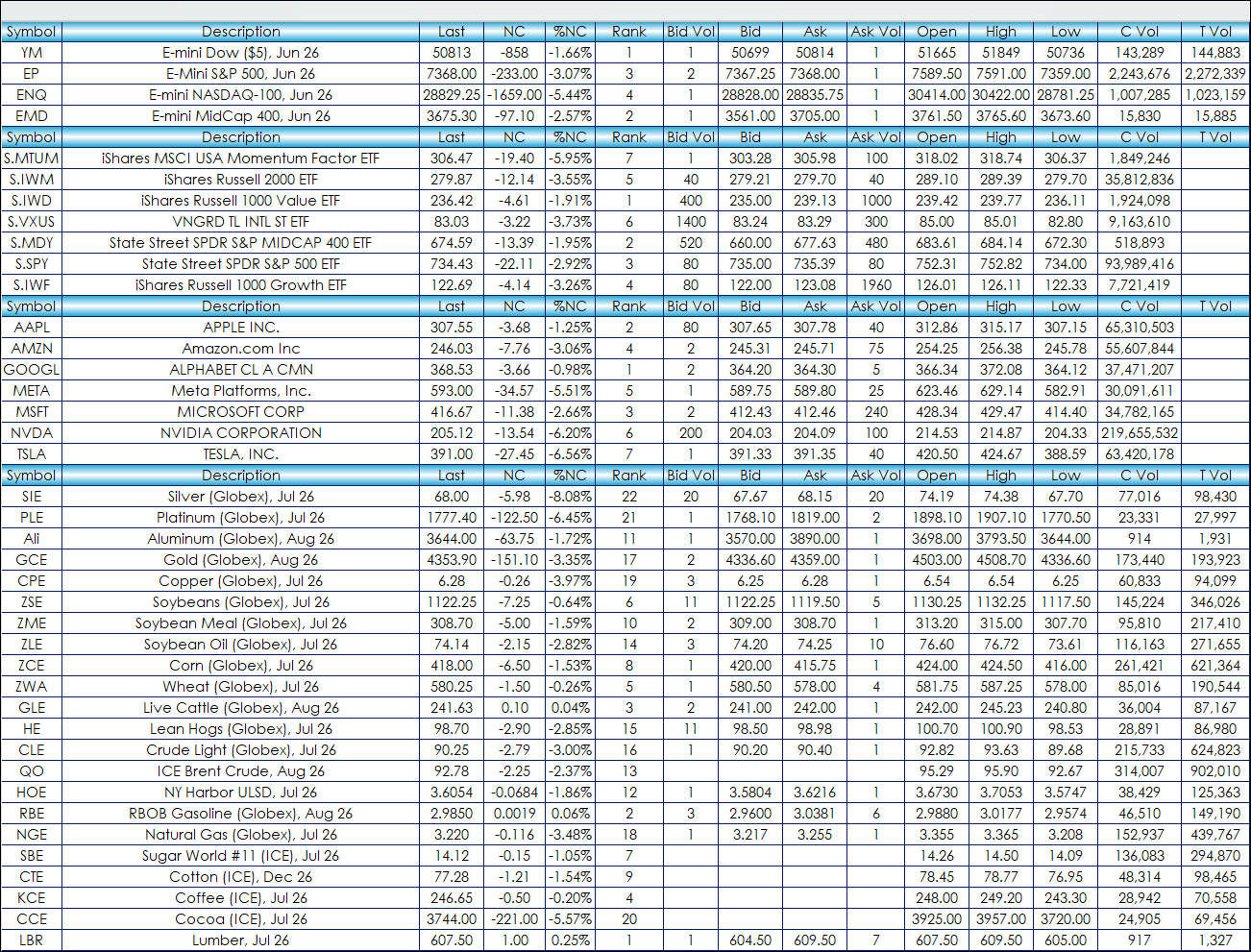
For more information regarding adding additional RTD Functions this post walks the reader through the steps to finding RTD functions: RTD: The Fastest Way to Find Market Data Labels.
This post details the RTD Functions for pulling in historical market and study values: CQG to RTD Excel Syntax for Historical Market and Study Values.
Requires CQG Integrated Client or CQG QTrader, data enablement for the various exchanges, and Excel 365 or more recent locally installed, not in the Cloud.