
The Double Exponential Moving Average study is a moving average calculation that reduces the lag associated with other moving averages. The Double Exponential Moving average is calculated as the difference between the doubled value of the Exponential Moving Average and the moving average of the moving average for the same period.
Using CQG's formula language the calculation is:
Dema:= 2*MA(@,Exp,DemaPeriod) - MA(MA(@,Exp,DemaPeriod),Exp,DemaPeriod);
Where DemaPeriod (default)= 3.
This chart below displays the DEMA (green line), Simple Moving Average (blue line), and an Exponential Moving Average (light green line), all using a lookback period of 21.
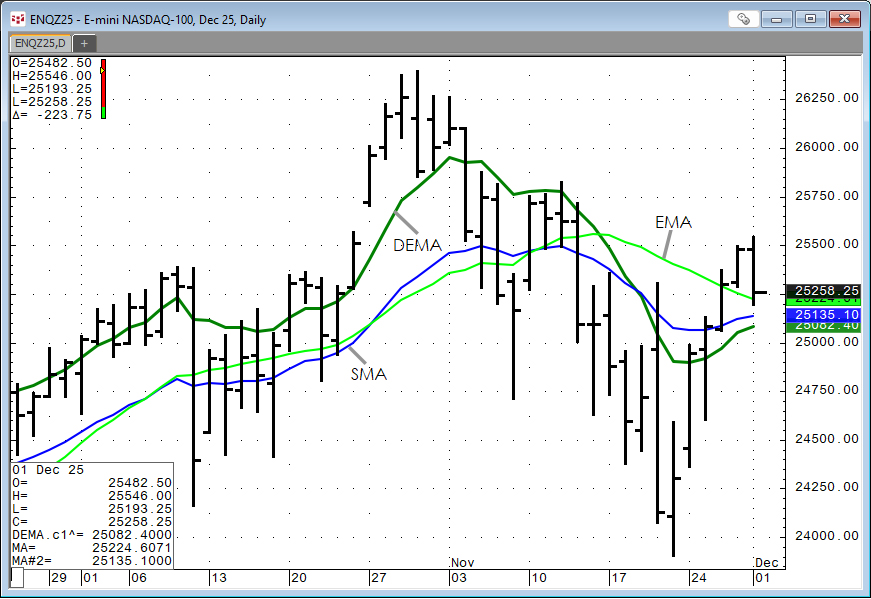
Comparing the three averages the DEMA tracks the price action more closely than the other two averages.
Excel users can use this RTD function to pull in the DEMA. The lookback period is the default period used in CQG:
= RTD("cqg.rtd",,"StudyData","ENQ", "DEMA^",, "c1","D","0","All",,,"True","T")To enter in a different lookback period the RTD function is:
= RTD("cqg.rtd",,"StudyData","2*MA(ENQ,Exp,21) - MA(MA(ENQ,Exp,21),Exp,21)", "Bar", "", "Close","D","0",,,,,"T")
Below is a downloadable CQG PAC that installs a page with the DEMA study. Also, included is a sample Excel file.
Requires CQG Integrated Client or CQG QTrader. and Excel 2016 or more recent.